Guitar Assistant for Guitar Teachers
Build lesson materials in minutes. Share with students instantly. Track their progress without the admin.
Your Complete Guitar Teaching Toolkit
Guitar teachers spend more time creating materials than they should. Hand-drawing chord diagrams, photocopying charts, managing requests over text, and tracking who practiced what—none of that is why you became a teacher.
Guitar Assistant's Teacher plan gives you a complete workflow in one place: a professional library of chord and scale diagrams ready to drop into lessons, a course structure to organize your material, per-lesson messaging to stay in touch between sessions, and clear visibility into what each student is actually practicing.
From a beginner's first open chords to an intermediate player working through modes, you build it once and share it with one click—on any device, without printing a single page.
How It Works for Teachers
Build Lesson Materials in Minutes
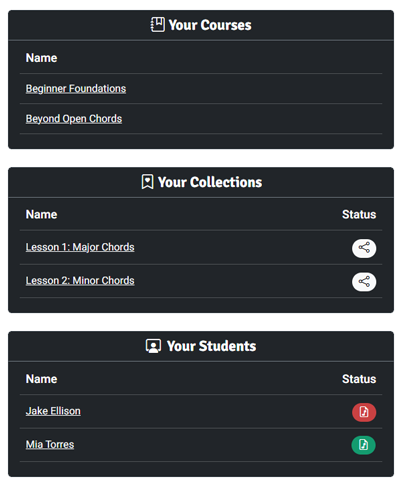
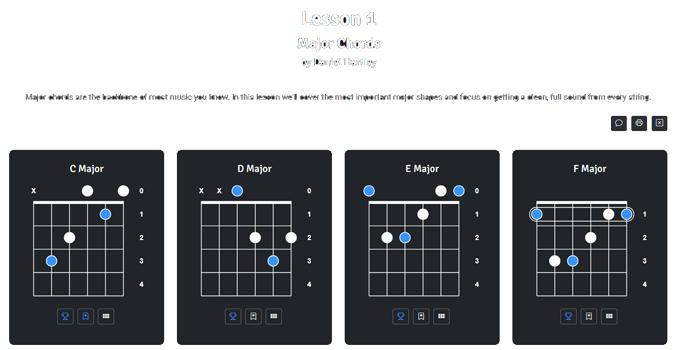
Guitar Assistant's library contains thousands of chord and scale diagrams across every tuning and skill level. Rather than creating charts from scratch, you browse the library and click to save any diagram directly into a named Collection—your lesson material.
Add your own instructional notes below any diagram: fingering reminders, common mistakes to watch for, context about where a chord appears in a song. Rename diagrams to match your teaching language. Arrange them in exactly the order you want students to work through them. A full lesson's worth of material typically takes a few minutes to assemble.
Organize Lessons Into Courses
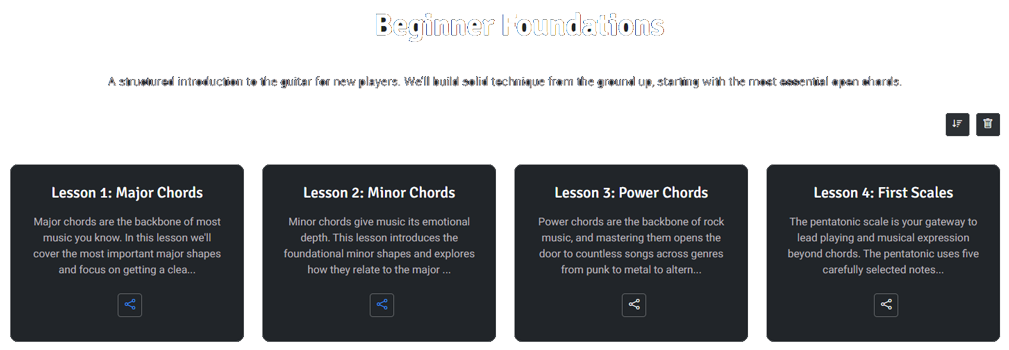
Once you've built your lesson Collections, group them into a named Course. A Course is your complete syllabus—an ordered sequence of lessons that students work through from their dashboard. Beginner foundations, chord progression studies, scale systems, or a course tailored to a specific student's goals: the structure is yours to define.
Each lesson inside a course has its own title, description, and content. You can add new lessons, reorder them as a student progresses, and update material at any time without disrupting anything the student has already completed.
Students See Assignments Immediately
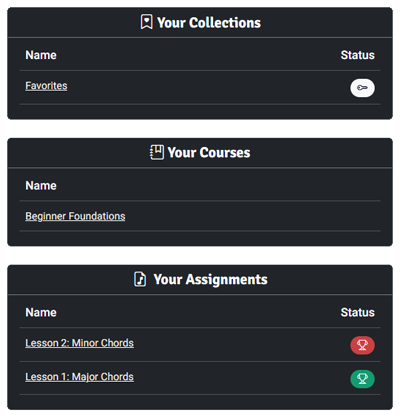
When you share a lesson, it appears directly on their dashboard. No email attachments, no PDFs, no links to track down. They open it on any device and see exactly the lesson material you put together.
Students work through their assigned lessons on their own time, with the same clean chord and scale diagrams they'd find anywhere in the library—but arranged and annotated specifically for them by you. The experience feels personal and prepared, not generic.
Chat With Students on Specific Lessons
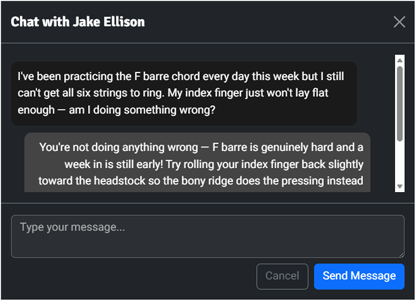
Each lesson has a built-in chat thread between you and the student. When a student gets stuck on the F barre chord at 11pm before their next session, they message you directly from inside that lesson—with the chord diagram right there in front of them. You reply from your dashboard when you're available.
Because the conversation is attached to a specific lesson rather than a general inbox, context is never lost. You both know exactly which material the question is about, and the thread stays with the lesson for future reference.
See What Students Are Practicing
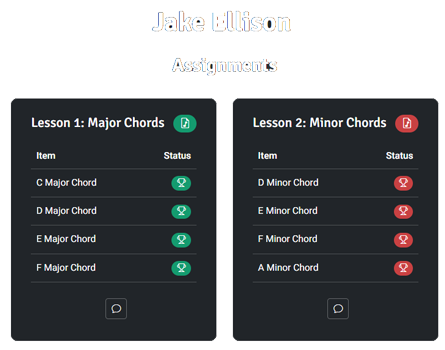
Students log their practice directly from within each lesson: how many minutes they spent and any notes on their progress or questions for next time. You see completion status for every assignment at a glance—a green indicator means they've practiced and logged it, red means they haven't yet.
Between sessions you can see which lessons are getting attention and which aren't, without having to ask. When a student walks in claiming they practiced for an hour but can't play the material, you have a quiet record of what was actually logged. It's not about surveillance—it's about having an honest picture so you can teach better.
Professional, Custom-Branded Charts
Some students learn best with paper in hand. Guitar Assistant's printing system lets you export any lesson as a polished, professional-looking chord chart—no design skills required. Choose your layout, paper size (Letter, A4, Tabloid, or A3), column count, and what appears on each diagram: clean shapes, fingering numbers, note names, or interval formulas.
Teacher accounts include your own branding on every printed chart, so handouts you give students carry your name—not ours. Printing is unlimited for Teacher accounts, so you can print a customized reference sheet for every student every week without thinking about it.
Ready to transform how you teach guitar? Try our Teacher plan completely free for 14 days.